Every button, up close.
See a real screen from the app, taken on a user's own computer.
Both sides are still waiting for each phone's QR code.
Let it run, or click through at your own pace.
Prepare to be surprised.
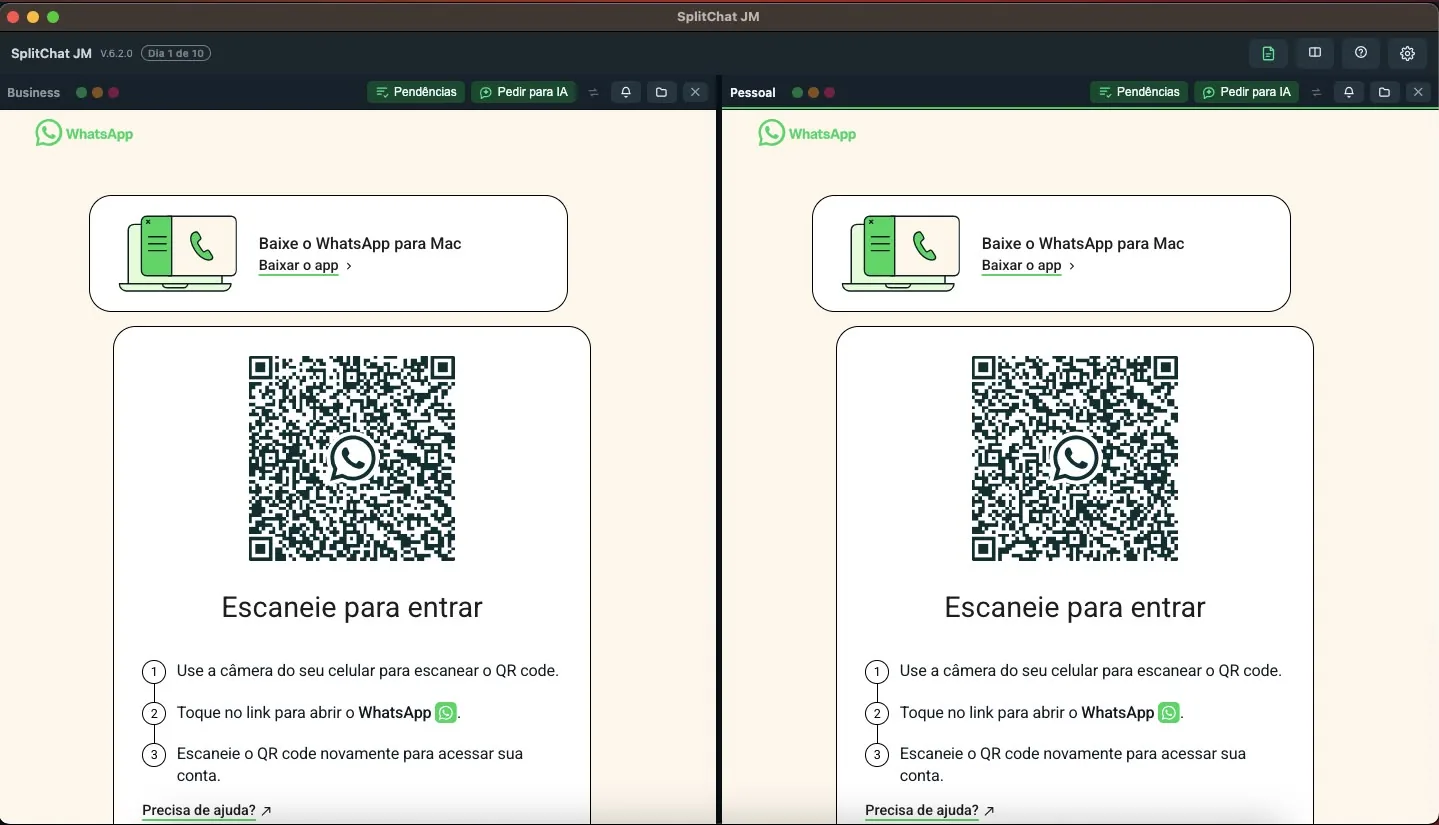
Your personal account and your work account side by side on the same screen, with far more than that.
Each side can be WhatsApp or Telegram.
With AI triage and colour tags to find the conversation that matters.
Mac, Windows and Linux, three languages, and your conversations never pass through a server of ours.
Do not use the browser. Two WhatsApp Web tabs eat memory, fall asleep when you switch windows and let notifications slip. SplitChat is a real application: it opens fast, stays light on every system, and does far more than any tab could.
Drag the line in the middle, that is exactly how it works in the app.
See a real screen from the app, taken on a user's own computer.
Both sides are still waiting for each phone's QR code.
Let it run, or click through at your own pace.
Prepare to be surprised.
Not an auto-reply. Real service: you teach it your business in a few steps and your AI starts answering on its own, on the account you choose, inside the hours you set.
Business name, signature, hours and the first message. That is all. Within minutes the AI knows who you are, what you offer and how to talk to whoever turns up.
The bot is capped. It never starts a conversation, never blasts a list and never answers the same contact twice in a row. That exists so your number does not look like a spam robot and so you do not risk a restriction on your WhatsApp Business account.
One account at a time, chosen by you. The work account answers on its own while the personal one stays untouched, with no bot replying to your family.
Set the days and the window. Someone writing at 11pm gets the away message and knows when you are back. No pretending there is someone awake on the other side.
Real screenshots, taken on a user's machine. The conversations are blurred and the phone numbers replaced with fictional ones: these are real working accounts.
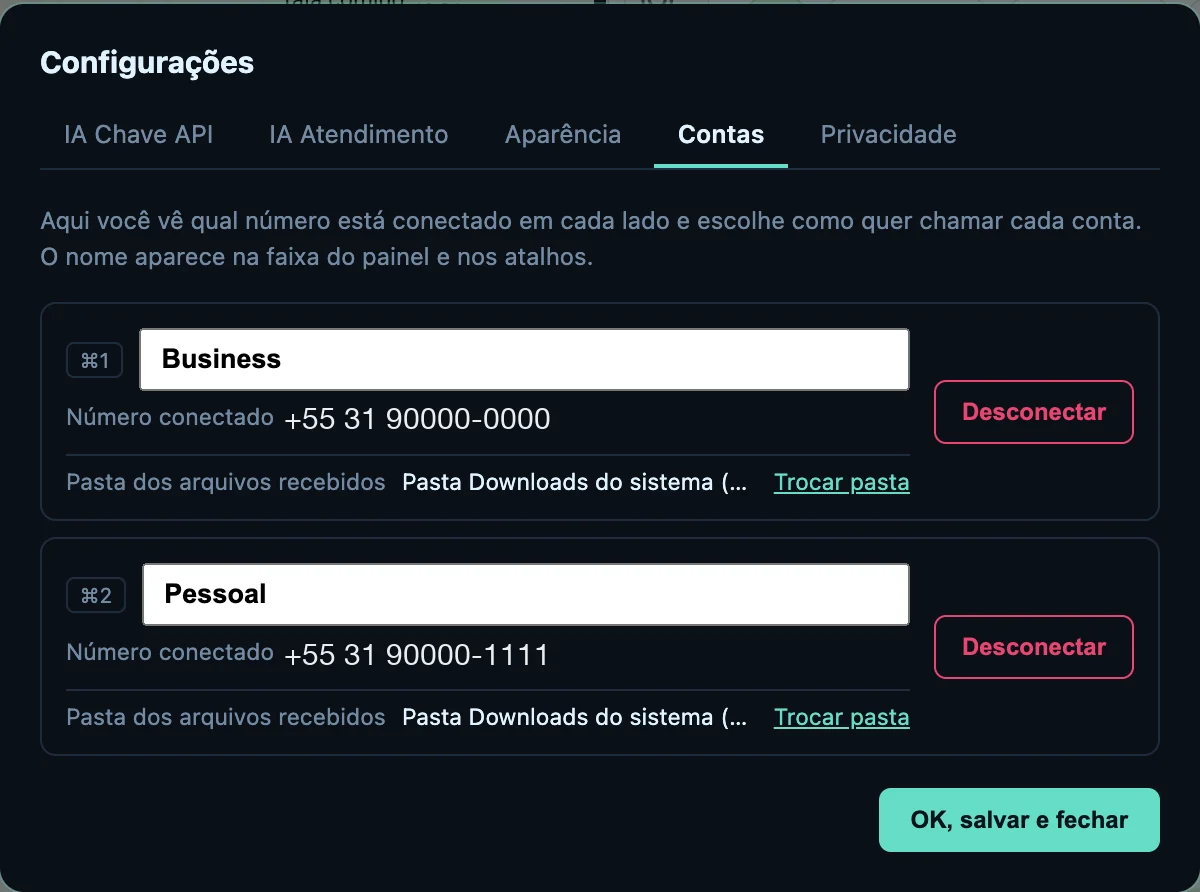
The number connected on each side, the name you give each account and the folder its files land in. Nothing gets mixed up.
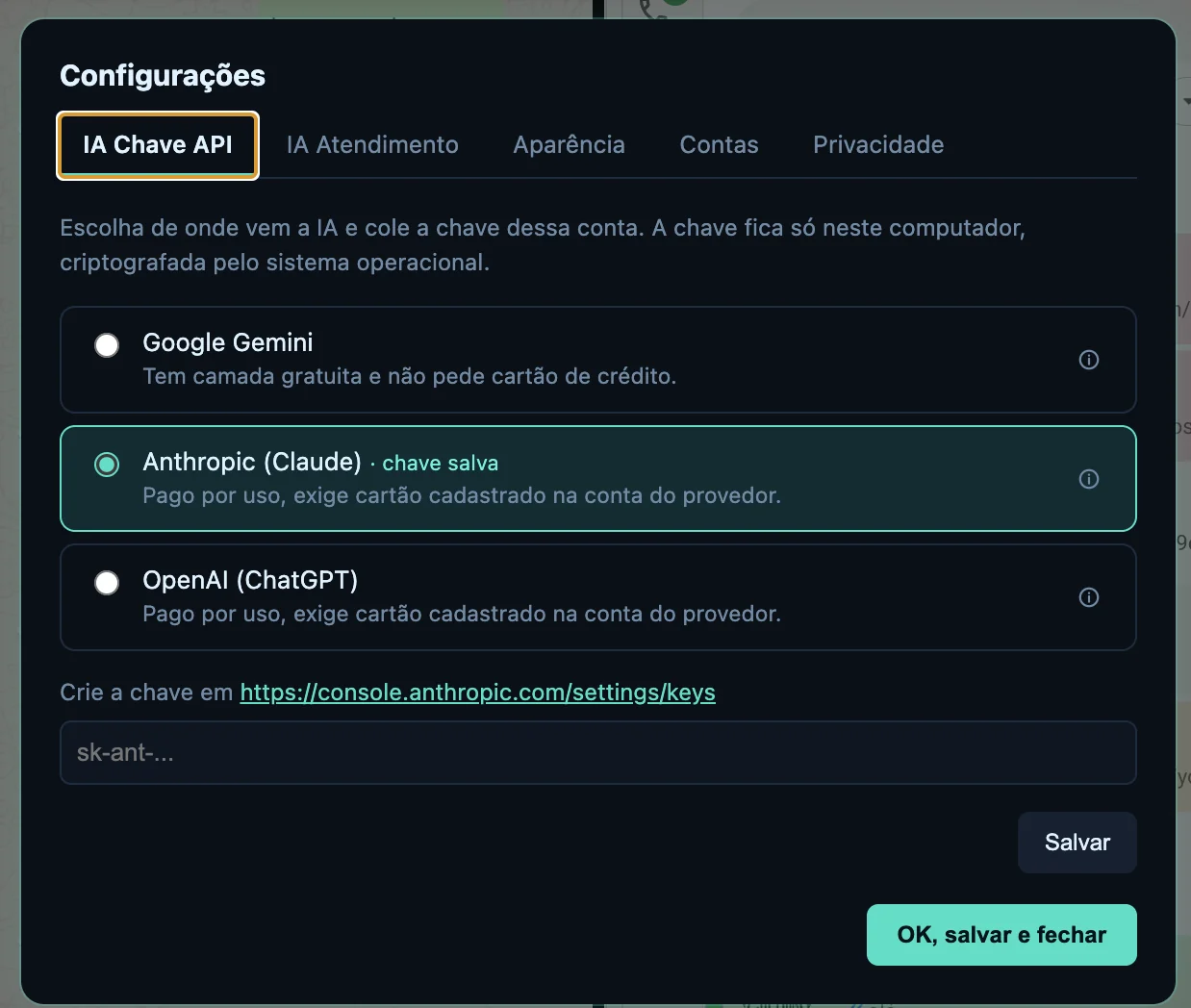
Pick the provider and paste your own key. On Gemini it is free and asks for no card. What you ask goes from your computer straight to the provider.
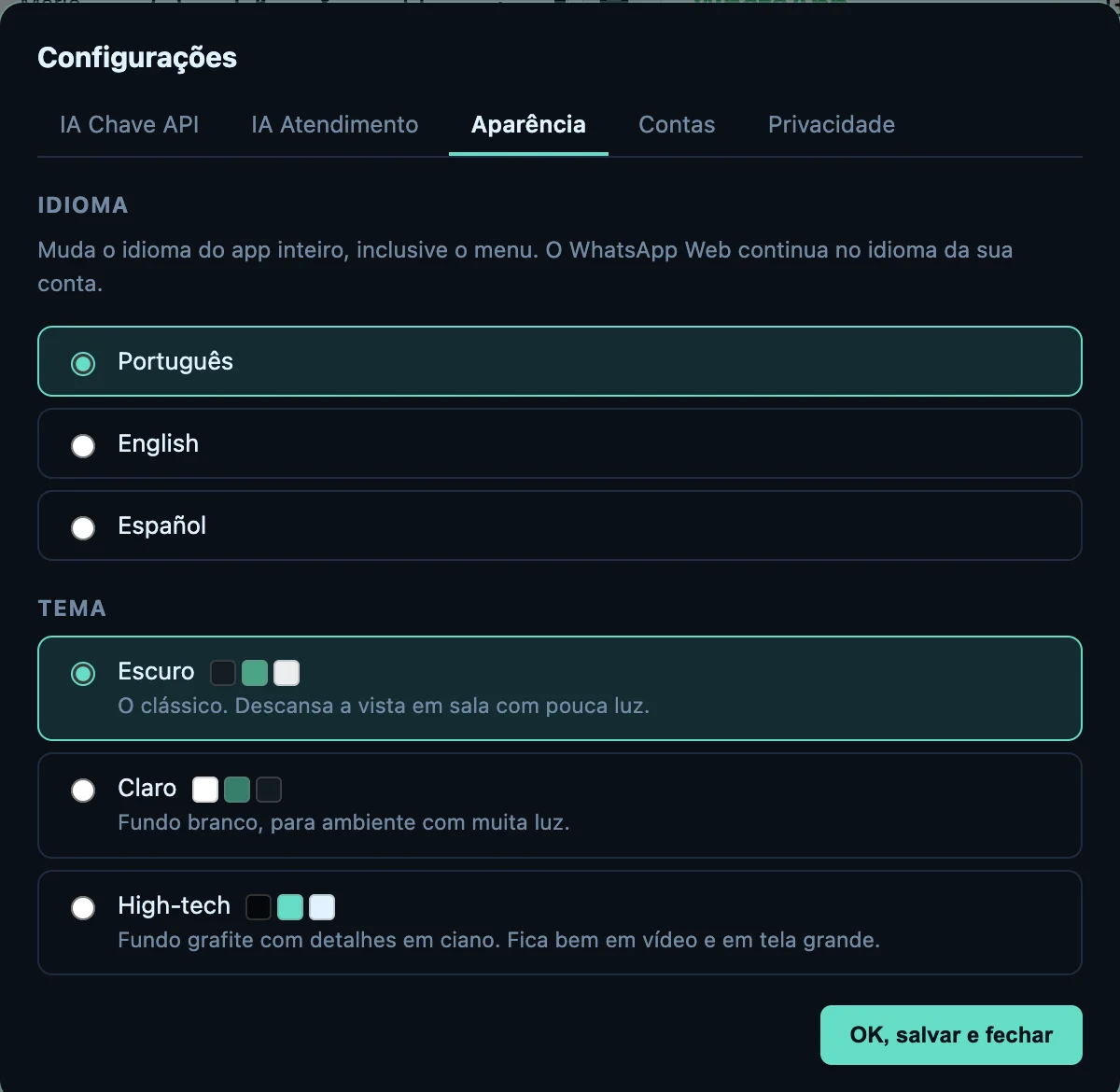
English, Portuguese or Spanish. Dark, light or high-tech. You choose once and the app opens that way every day.
If you answer clients on a work number and your family on a personal one, you spend the day switching apps, missing messages and replying from the wrong account. SplitChat fixes that with a single window.
Each side has its own login and its own QR code, fully isolated from the other. This is not one account mirrored twice, it is two different accounts, at the same time.
One button summarises everything still unanswered in that account, grouped by urgency. Another drafts and sends a message from a plain-text request, always asking you to confirm first. Works with Gemini, ChatGPT or Claude; Gemini has a free tier that does not even ask for a card.
Mark conversations green, orange or red. The row is tinted in the list, and one click on a colour shows only the conversations carrying it.
Close one side and the remaining account takes the whole screen. In place of the closed side you can open a tabbed notepad, today's call notes, what the client asked for, what you must not forget, right next to the conversation. Bring the account back with one click.
Each panel opens WhatsApp or Telegram. A shortcut in the panel header switches it instantly, without going into settings. Each account keeps both logins separately: switching back restores everything.
You download the zip for your system: .dmg for Mac, .exe for Windows and .AppImage for Linux, each with its PDF guide. Each purchase activates one computer.
Your conversations never pass through a server of ours. The app talks straight to the messaging service, the way your browser does, and collects nothing. With our server, only the activation request and support. With an AI provider, only if you turn the AI on and agree. Here is exactly how.
Switch on automatic replies for the work account and it answers people who wrote and are still waiting: a greeting for new contacts, a numbered menu, keyword replies and an away message outside working hours. If you want, the AI writes the reply following the instruction you gave it.
It never starts a conversation, never sends a broadcast, and stops the moment you take over at the keyboard. The limits ship tight, because protecting your account matters more than answering fast.
English, Portuguese or Spanish, it changes the whole app, menu bar included. And five looks: dark, light, high-tech (graphite with cyan accents), Stv (light and rounded) and Bill (grey and square). You also choose which account sits on which side of the window, and it swaps instantly, without disconnecting anything.
WhatsApp Web in two tabs eats memory, falls asleep when you switch windows and lets notifications slip. This is a native application for Mac, Windows and Linux: it opens fast, takes little room and keeps working while you do something else. And it gives you what no tab can: two real sessions, AI, tags, notes and an automatic agent.
Lending the laptop, changing phones, selling the machine? One button disconnects just that account; another wipes everything, accounts, notes, tags, photos and AI key, without going through us.
Each account saves attachments to the folder you choose, automatically. Client documents never mix with family photos.
Ctrl 1 and Ctrl 2 expand one account to full screen; the other becomes a thin strip that still shows how many messages arrived. Ctrl 0 splits again. Zoom is per account: Ctrl + and Ctrl −. On a Mac, ⌘ instead of Ctrl.
Most apps that promise to "organise your WhatsApp" ask you to connect your account to a server of theirs. This one does not: our server only receives the activation request and support messages, never a conversation. It is worth understanding that difference before installing anything at all.
No analytics, no automatic crash reports, no install ping. There is no sign-up and no user account, so there is no database of ours that could ever leak.
Your notes and your AI key are written to disk encrypted, with the key held by the macOS Keychain or Windows DPAPI and bound to your user account. Copying the file to another computer gets you nothing.
If you use the AI feature, the app replaces contact names with "Contact 1", "Contact 2"… before sending, and restores the real names in the answer, locally. The provider gets the subject without learning who you talk to. On by default.
The Hide conversations button (or Ctrl L) blanks the screen instantly, and only your 4 or 6 digit PIN brings it back. It can hide by itself after a few idle minutes, and when the computer sleeps or the screen locks.
The PIN is stored nowhere, only a one-way mark of it. Hiding the screen from someone walking past is exactly what it promises, and exactly what it does.
Settings → Privacy → Erase everything disconnects the accounts and deletes notes, tags, photos, layout and the AI key from that computer. It is immediate and it does not go through us, there would be no way for it to.
Because the content of your conversations never reaches us, we are neither controller nor processor of it. All of it is written down, without legalese, in the privacy policy and the terms of use.
A privacy promise is worth nothing unless you can verify it. Every line below comes with a way to check it yourself, without taking my word for it.
shasum -a 256 path/to/file. Windows: in PowerShell, Get-FileHash path\to\file. Linux: in the terminal, sha256sum path/to/file.
I do not claim the app makes you "anonymous" or "untraceable". It changes nothing about the messaging service itself: whoever has access to your phone or your account still has it. What I guarantee is what is under my control - that I never see, store or pass on anything of yours.
The app keeps working. Once activated, it does not depend on a server of mine to launch or for anything else: if the server goes offline, the activation stays valid. If I stop shipping updates, you are left with a copy that runs exactly the same, which is not what happens with a subscription service.
The app's AI works with a key of your own, and the app ships no built-in key. On Gemini the key is free, asks for no card and takes about a minute. Without a key the app works as usual, just without the AI buttons.
The recommended option and the app's default. You create the key in Google AI Studio with your Google account, with no credit card, paste it into the app and that is it. It is the only one of the three that costs nothing.
Pick the provider in settings and use your developer account's key. With those two, usage is billed by them, typically fractions of a cent per query.
Careful with this one: ChatGPT Plus, Claude Pro and Gemini Advanced are chat subscriptions and do not include API access, which is a separate product. If all you have is the monthly plan, use Gemini, it is free.
From download to first use
Download the zip for your system, with the installer and a PDF guide. On Mac, drag it to Applications; on Windows, run the installer; on Linux, make the .AppImage executable and open it. Then click Request unlock and type your purchase email.
Open the app and connect each account from its own phone, exactly the way you already do on the web version.
Drag the divider, pick a language and theme, add a photo to each account and set where its files should land.
Download it and use the whole app for 10 days. No sign-up, no card, nothing to ask anyone for. If it works for you, you buy it once. If it does not, delete it.
Not a cut-down version and not a demo. It is the full app: both accounts, the AI, the colour tags, the notes and the automatic agent. A quiet counter sits at the top of the window and only stands out in the last three days.
The trial works on all three systems, same app, same features. A .dmg on Mac, an .exe on Windows and an .AppImage on Linux, which is a single file and installs nothing on the system.
You buy through Hotmart. In the app, click Request unlock and type the purchase email. The request reaches me, I check the purchase and approve it, usually within a few hours. The app unlocks itself. You can request it during the trial too, by clicking the Day X of 10 counter.
The activation is tied to that computer and works offline. No sign-up, no password and no code to lose. Each purchase activates one computer. Moved to a new one? Talk to support.
Everything on this page, in a single payment.
It is written in the terms of use.
[PREENCHER: one intro line]
[PREENCHER: customer quote, with permission]
[PREENCHER: customer quote, with permission]
[PREENCHER: customer quote, with permission]
One purchase. No subscription, no recurring charge.
You can, and it is the route I recommend. Download it straight from this site and use it for 10 days, everything unlocked, on Mac, Windows or Linux. No sign-up, no card, no user account of any kind. A small counter sits at the top of the window so you know where you stand. If it does not suit you in the end, delete the app and that is that, you owe nobody anything.
You already have it: it is the same app as the trial. The purchase does not send another file, it unlocks the one you installed. If you have not downloaded it yet, the link comes in the purchase email and stays in the customer area.
There is no monthly fee. You pay once, through Hotmart, and in the app you type the email you used for the purchase. The request reaches me, I check the purchase and approve it, usually within a few hours. The app unlocks itself and the counter is gone for good on that computer: lifetime use, with updates still arriving the same way. There is no code to type or to lose. Once a day, when online, the app quickly checks that the activation is still valid; offline, it keeps working as usual.
No. The app runs entirely on your computer and talks straight to the messaging service, like a browser. There is no intermediary and nothing is collected. Our server only receives the activation request (your purchase email and a random code for the computer) and the messages you send to support. If you use the AI feature, only the names and previews of the selected conversations go to the provider you chose, with your key, at the moment you click, and by default the names are swapped for aliases first.
Two answers. The practical one: the app has no sign-up, no user account, and only talks to our server to request activation and for support, never carrying a conversation or a contact. The verifiable one: an app like this is a package anyone technical can open and read, and the only connections in the code are to the messaging service itself, to our activation and support server and, if you configure it, to the AI provider you picked yourself.
It does not have to. The app supports three providers. Google Gemini, ChatGPT and Claude, and you choose in settings. Gemini has a free tier that does not require a credit card: create the key in Google AI Studio in about a minute, paste it in, done. And the app works perfectly with no AI at all, you simply won't have the summary and drafting buttons.
It does. Each side of the window can be WhatsApp or Telegram, and you can have one of each. The shortcut in the panel header switches it instantly, and each account keeps both logins separately.
On both. Each system has its own zip, with the installer and the guide: the Mac .dmg, the Windows 10 and 11 .exe, and a 64-bit .AppImage for Linux that runs on current distributions without installing anything into the system. Every feature is identical across the three; only the shortcut key differs, Ctrl on Windows and Linux instead of ⌘.
Settings → Accounts → Disconnect, on whichever account you want. That login disappears from that side while the other keeps working. Your messages on the phone are untouched. To wipe the whole computer, Settings → Privacy → Erase everything does it in one go.
Each purchase activates one computer. To use it on another one at the same time, that is another purchase, activated the same way. If you replaced your computer, talk to support and I move the activation to the new machine.
Yes, exactly as with the messenger's own web version: the phone needs to be online for conversations to sync.
You can. The app takes as many accounts as you configure and divides the width between them. Two is the default because that is what fits comfortably on a laptop screen.
You get your money back. Within 14 days of the purchase, ask for the refund through Hotmart or message me on WhatsApp, no reason needed. You get the full amount back and the unlock on that computer is removed. How the refund works.
There is no call centre, no ticket number and no automated chat. The person who answers is the person who wrote the app. I send you the steps, and if needed I jump on a call and look at your screen with you.
Best for screenshots, error messages or a refund request. Reply within one business day.
One guide per system: installing, the Mac and Windows security warning, activation and connecting your accounts. It comes inside the zip, in Portuguese for now; the English edition is on its way.
14-day refund. If it does not work for you, write and you get your money back, no argument and no justification needed. It is written into the terms of use, not just a line on a sales page.
Try it free for 10 days. If it works for you, one purchase, one activation by email, and your two accounts fit on the same screen for good.
I want SplitChat $9 10-day free trial · One-time payment · Lifetime activation by email · Mac, Windows and Linux · 14-day refund